Skip to content

Making Connections

isee systems blog

Making Connections

  • About
  • More Connections
Search

Connecting iThink and STELLA to a Database

Updated: May 7, 2014April 28, 2011Filed under: STELLA & iThink5 Comments

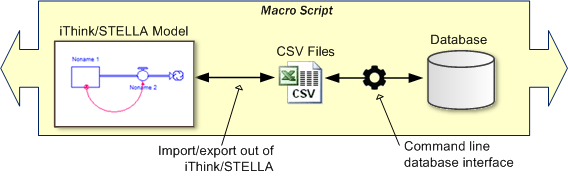
A question we periodically get from our customers is: Can iThink or STELLA connect to a database? Saving and pulling information to/from databases presents a lot of advantages for storing, organizing and sharing model data. Thanks to iThink and STELLA’s ability to import and export data via commonly used spreadsheet file formats, it is possible to use comma separated value (CSV) files as a means to create a connection to database applications.

Essentially, data can be moved between a database and iThink/STELLA by using a CSV file as a bridge. CSV files are a widely supported file standard for storing table data, and both iThink/STELLA and many database programs are able to read and write to them.

Process overview
The process of connecting to a database using CSV files as an intermediary

The process can be automated when you use iThink/STELLA’s ability to run models automatically from the command line (Windows only). Most database applications also have command line interfaces, allowing you to create a single macro script that moves data between your model and a database in a single process.

In this post I will use a simple example to demonstrate how to import data from a Microsoft SQL Server database into an iThink model on Windows. The model and all files associated with the import process are available by clicking here. If you don’t have access to Microsoft SQL Server, you can download a free developer’s version called SQL Server Express from the Microsoft web site.

The Model

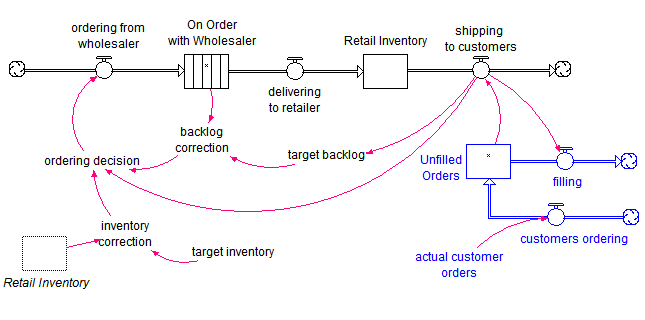
The model used in this example is a variation of the Beer Game model. The structure shown below represents the ordering process for a simple retailer supply chain.

Retail Supply Chain Model

The model has been set up to import the initial values for On Order with Wholesaler and Unfilled Orders stocks, target inventory and actual customer orders (a graphical function with 21 weeks of data). The source of the imported data is the file named import.csv in the example files.

To set up this example, I manually created the CSV file using the initial model parameters. (Later in this post, you’ll see that this file will be automatically created by the database.) The model has been initialized in a steady state with actual customer orders at a constant level of 4 cases per week over the 21 week period.

(more…)

STELLA & iThink
  • beer game
  • command line
  • database
  • export
  • import
  • SQL Server
5 Comments

What is the difference between STELLA and iThink?

Updated: March 9, 2011March 9, 2011Filed under: STELLA & iThink224 Comments

The question we get asked most frequently by just about anyone who wants to know more about our modeling software is “What is the difference between STELLA and iThink?”  From a functional perspective, there are no differences between the STELLA and iThink software — they are two different brands of the same product. The STELLA …

Keep Reading
STELLA & iThink
  • default settings
  • iThink/STELLA
224 Comments

Using PEST to Calibrate Models

Updated: December 19, 2017January 14, 2011Filed under: Modeling Tips238 Comments

There are times when it is helpful to calibrate, or fit, your model to historical data. This capability is not built into the iThink/STELLA program, but it is possible to interface to external programs to accomplish this task. One generally available program to calibrate models is PEST, available freely from www.pesthomepage.org. In this blog post, I will demonstrate how to calibrate a simple STELLA model using PEST on Windows. Note that this method relies on the Windows command line interface added in version 9.1.2 and will not work on the Macintosh. The export to comma-separated value (CSV) file feature, added in version 9.1.2, is also used.

The model and all files associated with its calibration are available by clicking here.

The Model

The model being used is the simple SIR model first presented in my blog post Limits to Growth. The model is shown again below. There are two parameters: infection rate and recovery rate. Technically, the initial value for the Susceptible stock is also a parameter. However, since this is a conserved system, we can make an excellent guess as to its value and do not need to calibrate it.

image

The Data Set

We will calibrate this model to two data sets. The first is the number of weekly deaths caused by the Hong Kong flu in New York City over the winter of 1968-1969 (below).

clip_image004

The second is the number of weekly deaths per thousand people in the UK due to the Spanish flu (H1N1) in the winter of 1918-1919 (shown later).

In both cases, I am using the number of deaths as a proxy for the number of people infected, which we do not know. This is reasonable because the number of deaths is directly proportional to the number of infected individuals. If we knew the constant of proportionality, we could multiply the deaths by this constant to get the number of people infected.


(more…)

Modeling Tips
  • calibration
  • data
  • h1n1
  • iThink/STELLA
  • Version 9.1.2
238 Comments

Posts pagination

  • Previous
  • 1
  • 2
  • 3
  • 4
  • 5
  • 6
  • 7
  • 8
  • …
  • 29
  • Next

Categories

  • Education (4)
  • isee NetSim (3)
  • isee.NET Framework (1)
  • Modeling Tips (32)
  • News & Announcements (16)
  • STELLA & iThink (15)
  • Stories from the Field (5)
  • Systems Thinking (8)
  • Training (6)

Archives

Browse by keyword

2D array archetypes arrays Barry Richmond Bass diffusion builtins calibration Causal Loop CLD command line conferences crisis data diffusion Education environment export game graphical function h1n1 healthcare housing import iThink/STELLA market dynamics MODSIM modules mortgage netsim optimization Physics policy price releases scholarship software spatial Stella storytelling System Dynamics Society Systems Thinking Version 9.1.2 video webinar workshop

Recent Posts

  • Socrates: Lowering the Barrier for Newcomers to System Dynamics in Stella® Architect 4.3 June 18, 2026
  • COVID-19: Modeling Distributions of Incubation and Recovery Times April 1, 2020
  • Multiobjective Optimization January 9, 2018
  • Optimizing Model Performance December 22, 2017
  • Calibration in Stella® December 15, 2017

RSS System Dynamics Forum

Recent Comments

  • best apps review on About
  • digital software on Modeling the Economic Crisis
  • Mishawaka Indiana on What are “Mental Models”?
  • La Paz Indiana on XMILE – An open standard for system dynamics models
  • Bristol Indiana on Modeling the Economic Crisis

Meta

  • Log in
  • Entries feed
  • Comments feed
  • WordPress.org
Products
Software (v1.3)
  • Stella Architect
  • Stella Professional
  • Stella Designer
  • Stella Simulator
  • iThink
  • Feature Updates
  • Policies
  • Publishing Options
  • License Agreement
Free Software
  • Stella Online
  • isee Player
  • Stella Architect Trial
Solutions
Consulting
  • Systems Innovation Practice
Common Applications
  • Business
  • Education
  • Research
  • Government
  • Energy
  • Health
  • Agriculture
  • Manufacturing
  • Conservation
Quick Links
About
  • isee systems
  • Systems Thinking
  • Barry Richmond Scholarship
Resources
  • Frequently Asked Questions
  • Product Help
  • Examples
  • Request Support
  • Request Quote
  • Systems in Focus
  • Quick Tips
  • Legacy Tutorials
News and Events
Upcoming Workshops
  • Introduction to Dynamic Modeling
  • Whole Systems Partnership
Newsletter
  • The Connector
Recent Webinars
  • Model Mysteries
Recent Training
  • Systems Thinking Practice
Press Release
  • Stella Architect Release

  Phone: (603) 448-4990   Email: info@iseesystems.com

   Monday - Friday: 9:00 am - 5:00 pm EDT | Saturday - Sunday: Closed
Wheelock Office Park | 31 Old Etna Rd, Suite 7N | Lebanon, NH 03766 | US

isee systems inc. holds registered trademark rights over the following: iThink®, STELLA®, Stella®, isee systems® and claims the following trademarks; isee NetSim™, Stella Live™, Causal Lens™ and Stella Online™.

Terms of Use

© 2017. isee systems inc . All rights reserved.